Saturday, 30 April 2016

Facebook, Messenger and Instagram Apps Now Available On Windows 10


Facebook, Messenger and Instagram Apps Now Available On Windows 10


Last year October, Facebook announced its new apps for Windows 10, the apps were released on Thursday and they include, Facebook, Messenger and Instagram. They are UWP apps and unlike some of the apps built for Windows 8,  these take advantages of some Windows 10 native features like live tiles and sharing across applications.
Facebook Windows app

The Facebook and Messenger apps for Windows 10 will only be enjoyed by desktop users for now, but the Facebook app for Windows 10 mobile will be available for users later this year, while there is no information on the release of the Messenger app for Windows 10 mobile yet.
Facebook app for Windows 10 loads easily and has full features such as Reactions, Stickers in comments and a column at the right displaying birthday, event reminders and trends. This will replace the Windows 8 version. A Live Tile shows you the newest update from your friends and Pages you are following. Photos can be shared directly to Facebook from your favorite apps or File Explorer, it also supports multiple tabs.
The Messenger app comes with features like photo sharing, stickers, group conversation, GIFs and seeing unread messages in the Live Tile. It enables desktop notifications which notifies you of incoming chat from friends and families.
Facebook Windows 10 live tile

Although Instagram has a previous beta version, a new version is now available on Windows 10 mobile with Instagram Direct, Explore and Video features. This app also supports Live Tiles too and Account Switching, a feature that manages multiple Instagram accounts.
With this welcome development, we are looking forward to the release of more apps from the Windows 10 platform for both the desktop and mobile versions.

Friday, 29 April 2016

WhatsApp leak shows new voice mail, call back, and ZIP file sharing features

whatsapp
While most rumors surround upcoming devices, or projects that Google is working on, there are still times where big updates get rumored for popular Android apps. A recent rumor states that Facebook-owned WhatsApp is about to get a lot more love from the developers.
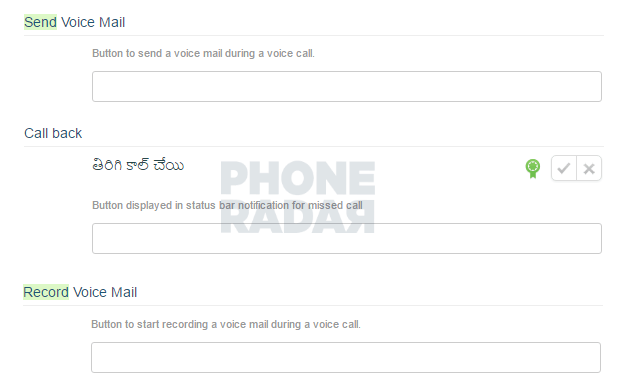
While WhatsApp already has the ability to make VoIP phone calls, there’s no way to know what a missed call was about. If this leak turns out to be true, that’s all about to change. The upcoming update hopes to bring Voice Mail to WhatsApp in addition to other Call Back features that can essentially allowing users to use WhatsApp for all their communication needs.
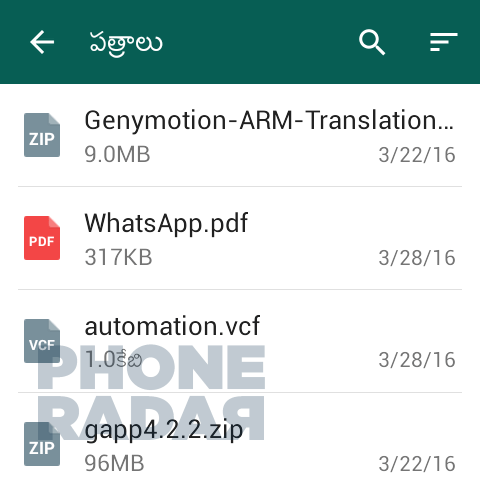
In addition to the new Call Back features, the leak also states the app will begin supporting ZIP file sharing between users. Currently, users can share PDF, DOCX, DOC, and VCF files, but ZIP files have been missing.
The leak doesn’t say when the update should be rolling out to WhatsApp users, but the images make it look like the update is already available to some and could be coming soon.

Firefox v47 Beta hits Google Play, introduces new feature to help reduce data usage

2016

firefox-beta-banner
Firefox has started pushing the latest update to its Beta app for Android. Now up to version 47, the mobile browser has started adding ways for users to save data while browsing the internet. Additionally, the browser will cease support for Gingerbread users in the next version. As for the rest of the changes:
  • New
    • Add ability to show system notification to highlight features on browser update
    • Add “Show/Hide web fonts” in advanced settings to reduce bandwidth and data
  • Changed
    • Show main domain (origin) or name of organization (EV certificate) in the URL bar (to prevent phishing attacks)
    • Stopped data usage when Firefox is in the background and a page uses meta refresh
    • “Open multiple links” setting under “Customize” has been renamed to “Tab Queue”
    • Notify Gingerbread Users that Firefox will no longer update after this release
    • Remove support for Android web runtime (WebRT)
    • Remove Favicons in Awesomebar to prevent HTTPS spoofing
These features aren’t game changing, but it’s always good to see developers finding ways to decrease their data footprint on mobile devices. Not everyone has unlimited data, so sometimes every megabyte counts.
Firefox Beta is free from the Google Play Store and the latest version is out now. Hit the link below and check it out. In the meantime, drop us a line and let us know what your favorite mobile browser is, even if you’re still rocking the tried-and-true Chrome browser.
Download on Google Play: Firefox Beta – Web Browser
[via Mozilla]

Tuesday, 26 April 2016

New MTN Free Browsing (NO VPN Needed)


HOW TO ENJOY MTN NEW FREE BROWSING

1. Use any MTN sim card 

2. Dial *460*6# (with zero credit)

3. You will receive a message telling you that your MTN Yello Life Plus service has been activated.... 


4. Then on your data and start browsing.

NOTE: Incase your browsing stops, Just go to your message and send BT to 131 and redial the *460*6# to continue browsing for free.