Thursday, 5 May 2016


It happens again, New Etisalat 0.0kobo unlimited free browsing is now working and blazing on android devices. For those that are desperate looking for a way to enjoy unlimited free here is a new way to rock with your Etisalat.No long story, let me go straight to the point to show you how it works.

How To Enjoy New Etisalat 0.0kobo unlimited free browsing on your Android device

=>It works with Psiphon handler so if you don't have it on your device click HERE to download any one from our download page.

=> After you download and install Psiphon handler on your devices. Open it and set it as shown in the images below.


Handler Settings
More Options Settings(Note: Leave everything unmarked)
Note: It may take upto 5minute before it shows connected..... 

Saturday, 30 April 2016

Facebook, Messenger and Instagram Apps Now Available On Windows 10


Facebook, Messenger and Instagram Apps Now Available On Windows 10


Last year October, Facebook announced its new apps for Windows 10, the apps were released on Thursday and they include, Facebook, Messenger and Instagram. They are UWP apps and unlike some of the apps built for Windows 8,  these take advantages of some Windows 10 native features like live tiles and sharing across applications.
Facebook Windows app

The Facebook and Messenger apps for Windows 10 will only be enjoyed by desktop users for now, but the Facebook app for Windows 10 mobile will be available for users later this year, while there is no information on the release of the Messenger app for Windows 10 mobile yet.
Facebook app for Windows 10 loads easily and has full features such as Reactions, Stickers in comments and a column at the right displaying birthday, event reminders and trends. This will replace the Windows 8 version. A Live Tile shows you the newest update from your friends and Pages you are following. Photos can be shared directly to Facebook from your favorite apps or File Explorer, it also supports multiple tabs.
The Messenger app comes with features like photo sharing, stickers, group conversation, GIFs and seeing unread messages in the Live Tile. It enables desktop notifications which notifies you of incoming chat from friends and families.
Facebook Windows 10 live tile

Although Instagram has a previous beta version, a new version is now available on Windows 10 mobile with Instagram Direct, Explore and Video features. This app also supports Live Tiles too and Account Switching, a feature that manages multiple Instagram accounts.
With this welcome development, we are looking forward to the release of more apps from the Windows 10 platform for both the desktop and mobile versions.

Friday, 29 April 2016

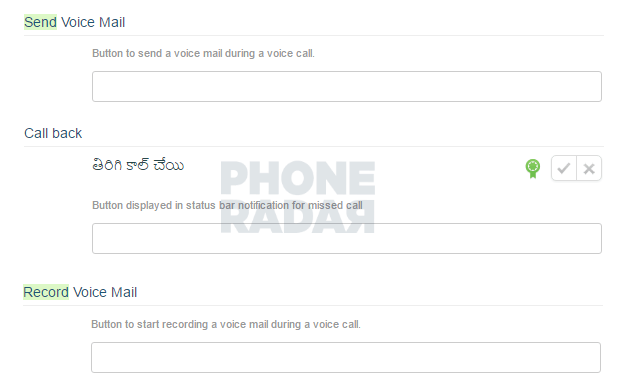
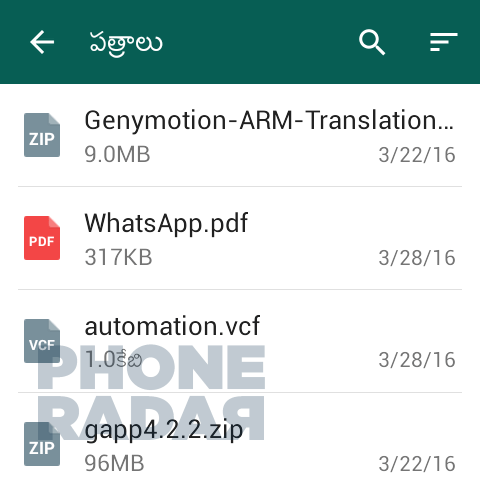
WhatsApp leak shows new voice mail, call back, and ZIP file sharing features

whatsapp
While most rumors surround upcoming devices, or projects that Google is working on, there are still times where big updates get rumored for popular Android apps. A recent rumor states that Facebook-owned WhatsApp is about to get a lot more love from the developers.
While WhatsApp already has the ability to make VoIP phone calls, there’s no way to know what a missed call was about. If this leak turns out to be true, that’s all about to change. The upcoming update hopes to bring Voice Mail to WhatsApp in addition to other Call Back features that can essentially allowing users to use WhatsApp for all their communication needs.
In addition to the new Call Back features, the leak also states the app will begin supporting ZIP file sharing between users. Currently, users can share PDF, DOCX, DOC, and VCF files, but ZIP files have been missing.
The leak doesn’t say when the update should be rolling out to WhatsApp users, but the images make it look like the update is already available to some and could be coming soon.

Firefox v47 Beta hits Google Play, introduces new feature to help reduce data usage

2016

firefox-beta-banner
Firefox has started pushing the latest update to its Beta app for Android. Now up to version 47, the mobile browser has started adding ways for users to save data while browsing the internet. Additionally, the browser will cease support for Gingerbread users in the next version. As for the rest of the changes:
  • New
    • Add ability to show system notification to highlight features on browser update
    • Add “Show/Hide web fonts” in advanced settings to reduce bandwidth and data
  • Changed
    • Show main domain (origin) or name of organization (EV certificate) in the URL bar (to prevent phishing attacks)
    • Stopped data usage when Firefox is in the background and a page uses meta refresh
    • “Open multiple links” setting under “Customize” has been renamed to “Tab Queue”
    • Notify Gingerbread Users that Firefox will no longer update after this release
    • Remove support for Android web runtime (WebRT)
    • Remove Favicons in Awesomebar to prevent HTTPS spoofing
These features aren’t game changing, but it’s always good to see developers finding ways to decrease their data footprint on mobile devices. Not everyone has unlimited data, so sometimes every megabyte counts.
Firefox Beta is free from the Google Play Store and the latest version is out now. Hit the link below and check it out. In the meantime, drop us a line and let us know what your favorite mobile browser is, even if you’re still rocking the tried-and-true Chrome browser.
Download on Google Play: Firefox Beta – Web Browser
[via Mozilla]

Tuesday, 26 April 2016

New MTN Free Browsing (NO VPN Needed)


HOW TO ENJOY MTN NEW FREE BROWSING

1. Use any MTN sim card 

2. Dial *460*6# (with zero credit)

3. You will receive a message telling you that your MTN Yello Life Plus service has been activated.... 


4. Then on your data and start browsing.

NOTE: Incase your browsing stops, Just go to your message and send BT to 131 and redial the *460*6# to continue browsing for free. 

Thursday, 31 March 2016

Prevent Others From Receiving Your Calls In Your Absence With Couchgram


Today i came across an amazing android app that i will like to share with you guys, with this app you will not worry or feel scared of any incoming call coming to your phone when someone is holding your phone, because you can be the only one that can be able to received the call with the support of Couchgram app.


Couchgram is a mobile app that requires you to unlock your phone in order to receive your calls.With Couchgram you can protect your privacy by preventing others from receiving your calls in your absence.


Kindly read the description of Couchgram below from the developers 

▶Call Privacy Mode
- Protect the privacy of your calls by being the only one to unlock and receive them.
- Place a call lock on either all of your contacts or just specific ones.
- Be able to display your friend's nickname without changing his or her contacts name. 
- You can also choose to not display either the caller's name or phone number for incoming calls!

▶Forward Incoming Calls to our Chatting Service
- Can't answer the phone at the moment? Then, forward the call to chatting mode!
- One simple tap on the 'Forwarding to chatting service' button on an incoming call and you're done!
- The caller doesn't have Couchgram? No worries, your friend will receive your message as a SMS.
- What about just sending a text? No! Couchgram forwards your call to our chatting service in one simple tap, and any messages sent from our chatting service are free.

▶Theatre Mode
- Be able to use your smartphone even in dark places like the movies by setting the screen's brightness to a darker screen than the usual phone configuration allows.
- Crowded places? Protect what's on your phone's screen by lowering the brightness. 
- Be able to spend time with the people you love without distractions. Use Theatre Mode to control your phone's brightness!

▶Incoming Call Wallpapers
- Express your preferences by selecting unique incoming call wallpapers.
- Try selecting photos that capture your favorite moments.

▶Status Bar Mode
You can simply turn on and off each feature in our status bar when you slide it down from the top of your phone.

▶Connect with Couchgram on Facebook
- Like us on Facebook for all the latest news and updates!
- Where? At www.facebook.com/couchgram 
- How? Voice your opinions and feedback!


 https://play.google.com/store/apps/details?id=com.couchgram.privacycall

Sunday, 20 March 2016

How to Add Facebook Profile Video

How to Add Facebook Profile Video


BACK IN OCTOBER, Facebook announced that users would soon be able to change their profile picture from a normal image into a short looping video. This features has been rolled out slowly but its now available in for some iPhone and Android users.

How do I add or change my profile video?
You can take or upload a video of up to 7 seconds to use as your profile video. Profile videos appear at the top your profile just like a profile picture. You can currently only add a profile video from iPhone or Android.
To add a profile video from iPhone:
1.       Go to your profile and tap your profile picture or video
2.       Tap Take a New Profile Video to take a new video or tap Upload Video or Photo to choose a video from your phone
3.       Tap Next, then tap the bar at the bottom of the screen to choose a thumbnail for your video
4.       Tap Save

To add a profile video from Android:
1.       Go to your profile and tap your profile picture or video
2.       Tap Take a New Profile Video to take a new video or tap Upload Video or Photo to choose a video from your phone
3.       Tap Next, then tap the bar at the bottom of the screen to choose a thumbnail for your video
4.       Tap Use

Note that this feature is not currently available in all locations.
- See more at: http://www.yomiprof.com/2016/03/how-to-add-facebook-profile-video.html?m=1#sthash.89MmCYN8.dpuf

Thursday, 17 March 2016

With sport tv app you can now enjoy all your favorite sports channels live on your android devices using sports tv app, it include the coverage of Premier League, Bundesliga, La Liga, Champions League, European Qualifiers, NFL, NBA, Cricket World Cup, Basketball, Tennis and many other sports as well.

I really enjoy sport tv with my MTN bb10 sub,with this app you will not have any issue of Buffering when streaming, because it work both on 2G and 3G service and it has good video and sound quality.


Where to download Sports TV App?

Click the link below to download and install it on your android device

=>Link<=

How to use Sport TV


=>Make sure you are connected to internet service 2G or 3G

=>Lunch Sports TV app

=>And wait for it to load all the sports channels available


=>Click on any channel you want to watch and select any server you wish, you can even choose server for 2G service if you don't have 3G service in your area.


 I hope with Sports TV you will not miss all your favorite sports shows?

Monday, 14 March 2016

Get Ready to Say Goodbye to 4G Network - 5G Network in Progress...


Ahead of the 2020 fifth generation, 5G commercial launch, Chinese original equipment manufacturer, Huawei said it was seeking global partnership to build and expand the mobile industry ecosystem to become more resilient to and ensure the success of the latest technology.
According to the technology giant, as a driving force to lead 5G innovation, Huawei has continued to extend the global partnership initiatives with more than 20 carriers, including CMCC, Deutsche Telekom, Vodafone, NTT DOCOMO, Telefonica, TeliaSonera and Etisalat, and 10 industry partners, spanning continents in Asia, Europe, and North America.
At the just concluded Mobile World Congress held in Barcelona, Spain, in partnership with foremost tech firms, it showcased technologies such as 5G New Radio Access Technologies.
Huawei initiated 5G research project in 2009. In the following years, Huawei’s 5G team has been continuously contributing its exciting breakthroughs to the development of 5G industry, including the identification of future requirements, earliest field tests of air interface technologies, world’s first sub-6 GHz 5G prototype...
The era of 5G is the era of everything on mobile… 

Thursday, 10 March 2016

Infinix Hot3 Features, Now Available For Pre-Order

The much awaited Infinix Hot 3 is now available for pre-order on Jumia… 2MP front camera for high definition selfie pictures. The 8MP back camera utilizes OV8865 sensor and 5-element lens camera to enhance light intake efficiency for superior picture quality.

Fun photography for everyone
Smile recognition (smart recognition for smiles)
Gesture recognition (fun selfies)
Voice recognition (smart recognition for the phrase “capture” or “ cheese”)
Timed photosgreat for selfies)
Touch capture (touch screen for instant focus and capture)
Focus Tracking (essential tool for spontaneous capture

Memory
Powerful Quad-core & large memory 16GB+1GB/2GB
HOT3 features the MediaTek MT6580 quad-core processor. Also included is 16GB internal storage and support for up to 32GB of external storage. Both 1 and 2GB RAM options are available to complement individual usage requirements. XUI is designed to optimize power consumption for long-lasting standby time.


Dimension
5.5-inch high precision display
The 5.5-inch screen features full-laminate GFF technology for 1.2mm high precision processing, which prevents glare while minimizing distance between glass and screen for exceptional clarity and vivid picture quality. Coupled with Multi-Touch 5, it is a truly responsive experience.


Battery Capacity

A 3000mAh battery is combined with low consumption design to enable 9hr of web browsing, 20hr of talk time, and 33hr of music.
OTG support provides 1A reverse charging to share power with other electronic devices and is indispensable as a mobile charging companion. It is compatible with devices such as printers and portable hard drives for a high degree of convenience.
Enjoy high quality music
2nd generation music amplifier utilizes unique RNS and noise canceling technology from Aiwei to effectively limit TDD noise. Anti-sound break technology is implemented to smooth out tracks for superior playback quality.


NO DECLARED AMOUNT YET!!!
Pre-order it on Jumia here

Wednesday, 9 March 2016

Make WhatsApp video calls right now with this app

Booyah is an application that has beaten WhatsApp to the punch on its own feature. It brings the ability to conduct video calls between your WhatsApp contacts before any other app has on Android.
To use the video conferencing feature, the individual or group of contacts need to have Booyah installed on their devices. The interesting thing about this app is that only WhatsApp contacts can receive and accept invitations for video calls, differentiating Booyah from other video conferencing apps on Android.
booyahwhatsapp
A Booyah group video chat. / © ANDROIDPIT
During our tests, we noticed that the Booyah fared better in calls limited to two people; group chats fell victim to poor audio quality at times. In both cases, the image quality was about average, comparable to Skype.
Another point worth highlighting is the way calls are made. Instead of the application using a traditional direct connection, Booyah sends users a link inviting them to join the video call.
notificacoesbooyah
Booyah's system of video chat notifications. / © ANDROIDPIT
So the only notification that is sent to the invited users is a message containing a link to the video call, which will show up as a WhatsApp message notification. If a user doesn't have Booyah installed, the message will be replaced with a link to download the app through the Google Play Store.

Download Booyah for Android

Booyah is now available for Android and can be downloaded from the Google Play Store using the button below:
BooyahVideo Chat for it WhatsAppInstall on Google Play7
The application began its life on iOS, but has now made the move over to Android. Hopefully the developers can correct the problems with audio quality and optimize the way Booyah invites users in future versions of the app. But, for those who don't want to wait for the official WhatsApp video call update, Booyah offers a solid alternative.